
Aniimo controls: keyboard shortcuts, controller and mobile
On PC you move with WASD, attack with left click, enter Catch Mode with right click and Twine with C. Q and E cast skills, R fires your Ultimate, T uses Mobility and 1 to 4 swap Aniimo. On controller, RT twines and LT opens Catch Mode. Shortcuts can be changed under Settings › Controls.
On this page
Aniimo plays on keyboard and mouse, controller and mobile. The game lists its PC shortcuts in its help center under Shortcuts. This guide covers those default keys, then the controller layout and the touch buttons described in the game’s tutorials.
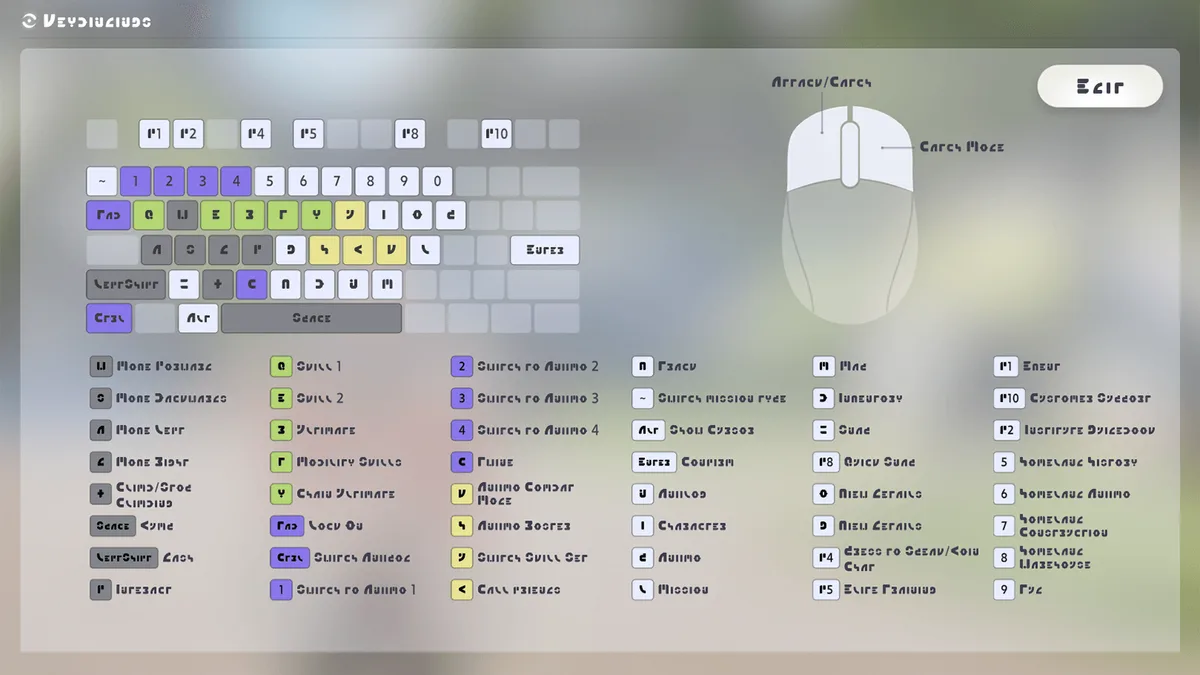
On PC: default keys
These are the keys the game lists for a QWERTY keyboard. If you use another layout (the French tutorial, for example, refers to ZQSD for movement), check the labels under Settings › Controls, which is also where you can change them.
Movement
| Key | Action |
|---|---|
| W / A / S / D | Move forward, left, backward, right |
| Space | Jump |
| Left Shift | Dash (hold a direction to sprint) |
| X | Climb / stop climbing |
| F | Interact |
| Mouse | Look around |
The help center explains that holding a direction and pressing Dash puts you into a sprint. Climbing, swimming faster and rising while flying all cost Stamina.
Combat and catching
| Key | Action |
|---|---|
| Left click | Attack / Catch |
| Right click | Catch Mode (press again to leave) |
| Ctrl | Switch Aniipod |
| Tab | Lock On |
| C | Twine (and untwine) |
| Q | Skill 1 |
| E | Skill 2 |
| R | Ultimate |
| T | Mobility |
| Y | Chain Ultimate |
| 1, 2, 3, 4 | Switch to Aniimo 1, 2, 3 or 4 |
| J | Aniimo Combat Mode (Attack, Catch, Defense) |
| H | Aniimo Party |
| Page Up / Page Down | Previous / next party |
When an Aniimo is in BREAK, the interact key (F) performs a Quick Catch. Our combat basics guide covers the rest.
Menus and system
| Key | Menu |
|---|---|
| Esc | Main menu |
| Alt (hold) | Show Cursor |
| M | Map |
| B | Inventory |
| P | Aniimo Management |
| I | Character |
| K | Aniilog |
| L | Quests |
| Key below Esc (backtick) | Switch Quest Type |
| V | Track (route to the objective) |
| G | View Details |
| N | Close Pop-up |
| O | Gestures |
| Enter | Confirm |
| F1 | Season Hub |
| F2 | Event |
| F3 | Elite Training |
| F4 | Institute Guide |
| F5 | Push to Talk |
| F7 | Snap |
| F8 | Quick Snap |
| F9 | Shop |
| F10 | Support |
| F11 | Rules |
In your Homeland
| Key | Screen |
|---|---|
| F6 | Home |
| 0 | Home History |
| 5 | Home Aniimo |
| 6 | Plot Management |
| 7 | Home Building |
| 8 | Home Warehouse |
| 9 | Index |
| - | Home Design |
| = | Home Season |
In your Homeland, scroll the mouse wheel to zoom out into Edit Mode. There, the movement keys pan the camera, the wheel zooms, Q moves the camera up and E moves it down. In multi-select, middle click rotates the view, left click selects (or drags a selection box) and right click drags a deselection box.
Photos
F7 opens the camera and F8 takes a quick snap. Inside the camera, R cycles modes (Creative, Selfie, Follow) and Space takes the shot. See our photo mode guide for details.
On controller
The game names face buttons by position. South is A on Xbox and × on PlayStation, East is B and ○, West is X and □, North is Y and △.
| Button | Action |
|---|---|
| Left stick | Move |
| Right stick | Camera |
| South (A / ×) | Confirm; Jump / Climb |
| East (B / ○) | Back; Dash |
| West (X / □) | ATK; cancel climb |
| Left stick press | Track |
| Right stick press | Lock On (hold: cancel lock-on) |
| LB / L1 | Skill 1 |
| RB / R1 | Skill 2 |
| LT / L2 | Catch Mode |
| RT / R2 | Twine |
| D-pad up, right, down, left | Switch to Aniimo 1, 2, 3, 4 |
| West + South (X + A / □ + ×) | Mobility (combination listed by the game) |
| North + East (Y + B / △ + ○) | Chain Ultimate (combination listed by the game) |
Some screens have their own buttons, according to the tutorials:
- Map: LT and RT adjust the zoom, Back closes it. Outside Idyll, D-pad left switches to the Idyll Map so you can pick a Transporter and head back.
- Day and Night: in the Day and Night Switch, D-pad down skips straight to nighttime.
- Aniimo Management: left stick press shows evolution info, North performs Quick Level Up or Evolve.
- Catch Mode: hold Lock On to cancel the lock.
On mobile
Keys are replaced by on-screen buttons:
| Gesture or button | Action |
|---|---|
| Joystick | Move (hold Dash to run) |
| Swipe the screen | Rotate the view |
| Jump / Dash / Dodge | Jump, dash, dodge |
| Climb | Appears near a climbable wall |
| Catch, then Throw | Catch Mode and Aniipod throw; Exit to leave |
| Lock On, Switch, Cancel Lock-On | Target handling (tutorials also call them Aim and Exit) |
| Twine | Twine with or untwine from your Aniimo |
| Aniimo avatar | Switch that Aniimo into battle |
| Attack, Skill, Mobility, Ultimate | Combat |
| Aniimo Combat Mode | Change your Aniimo’s behavior |
| Quick Catch | Catch an Aniimo in BREAK |
| Track | Show the quest route |
| Snap | Open the camera |
| Menu | Function Menu |
Settings to pick early
The game offers two selections that change how you play.
Guidance Level:
- Relaxed: clear, simple guidance with hints when needed. Built for players with some open-world experience.
- Detailed Guidance: step-by-step support, recommended if you’re new to open-world games.
- Immersed Exploration: minimal guidance and a bigger focus on discovery.
Action Mode (targeting):
- Attack Lock-On: a hit locks onto the target, without locking the camera.
- Manual Lock-On: you lock on with the Lock On button, and the camera locks onto the target.
Lock-On Mode, Camera Mode and Smart Cast can be changed any time in Settings.
Switching between day and night
Some Aniimo only come out at night. Open the Function Menu (Esc on PC), then the Day and Night Switch, and use the button to jump straight to nighttime. For what to do next, read our beginner’s guide.
Frequently asked questions
Can you rebind keys in Aniimo?
Yes. Settings has a Controls tab on PC and controller. The game asks you to press a button to change a shortcut, and it won’t let you assign certain special buttons.
Which button twines with an Aniimo?
C on PC, the right trigger (RT/R2) on controller, and the Twine button on mobile. Press it again to untwine.
How do I show the mouse cursor on PC?
Hold Alt. The cursor appears so you can click the interface without opening a menu.
What does the Y key do?
It triggers Chain Ultimate, the combo that works when more than two Pathfinders are in the same party.